Notepad++ is a great text editor and I keep using over and over. I found some GLSL syntax highlight UDL files in the site but they were not up to date and most importantly they we’re not prepared to work with dark themes. So I made two UDLs for GLSL 4.3. One for the default theme and another to use with dark themes. The extensions supported are: vert frag geom tesc tese v f g.
The zip file contains both. To install the themes go to “Language”->”Define your language”. In the “User Defined Language” dialog select import to load the files into notepad++.
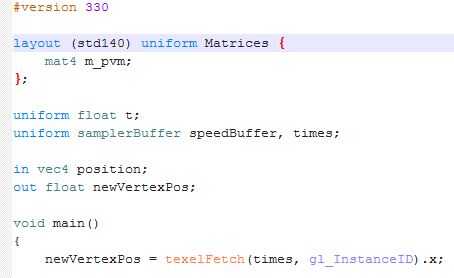
Here are some screenshots. Light version with default theme:
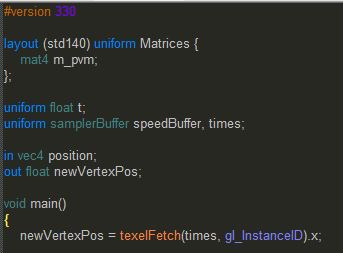
Dark version with Monokai theme:
Doesn’t seem to be working with v6.8.8
Correction, it works, I just had to disable the global foreground colour.
I tried everything…doesn’t highlight for me
Hi Dave,
Does it appear in the language menu?
This was useful to me, and worked in Notepad++ v6.8.6, so thanks!
Thanks it’s useful for me!
Thanks ! Working great in Notepad++ v.6.8.3 🙂
it is very nice indeed… why it is not in the official npp release yet? would you mind if they use your contribution? thank you very much 🙂
I don’t know. I’ve already told them. Got no feedback, but maybe there is something wrong with my files …
Hi, thanks for your plugin. Any idea why dark theme looks like this? http://i.imgur.com/0HFfhap.png
Hi,
I forgot to mention something in the post 🙁
In notepad++ go to settings->style configurator. When selecting a dark theme as Monokai you must check the “Enable global background colour” option.
Let me know if this works for you.
Best Regards,
Antonio
Like a charm, thank you!
This is very helpful, thanks.
Awesome stuff, thanks mate.
where is link to xml file?
Hi, you can find the link in “The zip file contains both.”
I’ve looking for it for a long time ,thx!