Lighthouse3d.com

uW(.JUMLO-O)ͭKLSW(L)ɰU7TWHL(3RRl bJP< Send me bugs and suggestions, please
VRML Script Tutorial
Full list

VRML Interactive Tutorial

Introduction
VRML File Structure
Drawing: Shape node
Geometry Nodes:
Box
Sphere
Cone
Cylinder
PointSet
IndexedLineSet
IndexedFaceSet
Extrusion
ElevationGrid
Example: Chessboard
Text
FontStyle
Appearance
Material
Textures
Image Texture
Movie Texture
Pixel Texture
Texture Coordinate
Texture Transform
Let there be Light
Directional Light
Point Light
Spot Light
Materials with Colored Lights
Hierarchical Node Structures
Group
Transform
Collision
Anchor
Billboard
Switch
Inlining Files
Defining and Instancing Nodes
Defining Levels of Detail
Events in VRML
Creating Paths between events: ROUTE
Generating Events based on Timers or User Actions
Timers
Touch Sensor
Visibility Sensor
Dragging Sensors
Plane Sensor
Sphere Sensor
Cylinder Sensor
Proximity Sensors
Example: Proximity sensor
Interpolators
Color
Coordinate
Normal
Orientation
Position
Scalar
Example
Let the Music Play
Sound
AudioClip
Bindable Nodes
Who Am I: NavigationInfo
Where Am I: ViewPoint
Adding Realism to the world
Background
Fog
Information about your world
WorldInfo
Definition for Auxiliary Nodes
Coordinate
Color
Normal

}{69`yƖ͗ӱ3cOn'{EBjڔ!~wod%H"ν'[  ƒGt}I.yx9"BiO>x>K 7Iiv+m,Bz֝Q22 Yu$#(J0hd71 r8 <7 Q\C&eA$?1yEu.,NAVh G?Y4`dx?=ޒil26-kt-dFA̹\I{ /C vtSMc9A :98xwK6ftM6*MD3 dן^‚1}C)a1=w8Kwė;4؂_ 9$i.`͑AVܭlLpҐ1&,2IAqւ&w/@o4f˴YH[t0~L)6.dJ e%ݸ[HcOpI0iP%cbnRP?}:&ЁM\kLt"YM(w9cwbSZqhZu=w}컾At900l,;u}YfPwޘF.F% T(t۶1lli<6˰ k8p J 5EGi([.3:vК0 -!P\Q8$4޷z9+vg^g7kE[vJ N3 7K%pi1۫ Z/čW1  }SC tVh~!⿸Ӂ<>/,0tx~< )DEd"dy@k6Yӵ ͮn+Ǭ. ntTL"30؅ bWuE8g0MXi!EtqWq9Lz>,uUiEcRO)U* ZV`E8yh4`}8|5q1!X6P2U%l«΢d Чc?wl: m3qDs 2 R,ى xEILX)zyX ,DjE(u,by&M$V7[Sr0n>3M\@ 1F w4-ڹf8s+rQ tp8ݭʹlrl]+w.| }OC[ NnNM!s#"H42)a]P0,GzQ1.|)yL=N1el8Mn`2?`Y;Z*S=l{mǹ7baInv&VQI[铘3NRj wKG ģS:U%0⚢/T1"h \ xc;lCd!=ՙ}mGd# ё_#3I7&734- w'P h쏚&v!dAn0݁O7` %2-fCYkeWO"bn|0Io9J1M!ͩLŻ4HGI6M1v<&G.Ь}E""791~AŸv%m9)Z'-fH.-3d6i3Z֠C´ղAu\U,+q1Ҳ94ꍮe m]1ճBa L+[Ɂ55Ӈj^_P:7殪aW_u}p樷z/BM D,;+8P-5-QXC@N@kE#nET 1* (C z@^5ᵱP]^ 2=IӃH*)ݾUYAeBiZ&Fh ̑at_̹DcX{U %S?0LCG )MwnXLcLK:۴QF.Hx&RoKI c C]8g2 ;s2\c\#5$!8 o#IsG~>PXd$nw } h͖ ca D#]pVD7~^ڧ4X?z4NUͪ[kj_.ٜx$D 38{InZ&С{@4\rfw*YeIߐ5.J+l <˿lsL:F!rJpWYeLAMqJ0a;|dRQDH=UeVVYҼ,_]iώl.Sy2٭Sp1Zb&YOAUy ^X_euQIEEkŶʺ6b4b5Ex]+o])/s` }8Vl!5Է0vݹNJ+[l`:`լcoZe+wxUl{+?܋kkkmkMkPa ۰&u5]jjlUTQjl ;ئC=TlJU㶍֩wJCg|j{ Jx`}cj7m3^rVt7Gݐ6;fFQGyzʬuU=O?+PUp\cPe * Y9U]{Km S.uoΌ'9;V,@q,Kh%z#u:?yle0cf,ڝ;SvKVU8Ołd}:J'-<;(4YHNG/g^[q\ޠ7r=~xRc"@fE촿gY.o^GIɖ[Q{2GcE( >\C%U~QwQop$BEx,I2F8~ST *hjSu$;*7b#{a uzf4K*0N ``I'\K[&)1 Q|p-jJK/X?Ӛ-l=ViY՛McU`Ek"}xEU"=ʅ"hv*b>^qcݾL,榮znʜrsȝ`p3ng+Zɑɵ~^f*#gŖZeTS ȷ=u gp|b 0[BN6_!ɂQO-o3o֕?b!P̔&t-&1 Y9])>iUz{1@K0WQpҴEjG.jox7q[v[BdI.WlQRb:cGbْ;!EE>x% :DY` [yMcXZWF 27u77$ hl"}'QGW M 勦E8=ZPr| 3ݮis-MQSٍT՗4mYYK+O&"tTPKQfU\÷cUWM%,Yg']PgGx|]\[r_!~v"Oy>:*  Y]g@,l1?Whqz" A; ITS.F sc9wh _etxX=H1pkФQm^Yt_/Q0J4lĞyV* m'ݓ]%|_}n '?z!8\-^Nic7Mk`~[wIӁ{W[[>F/lwmTk7,C]8ڶ-ܭ>z}'4A'ʎp\Ka'`'F )"F P,Ѿ{0>VL }?hpn'~}BҢI%+(vBrq~bdH)~!+=*9q)&@l"8{')Ms_/TovVl޵F/AMca% u$r:]Kx~>x\̚V[djha-&m+Zطc[ P2Qܤ<]o1y\8_mJcܱyyx[>)Cͻ](aGs dTR#2E wFHZV \YAx˶(KIc<|S7LEu![ g ?|Cz9#x:^Y3-/8 OZY$d)7W6S(0#`"I0, Ad ʹu#f9rwBJi췽0Ꮜti^[6 TD-IyeP8o&33? 2pUGiio "7H q<21&Log`]9IДJ6hY֯mڶJqQ-El_lږlH:u2 \\-M 3c2U I̎Z/7Ϗ€bo:D TlE0v~b'1pLx)VcN[`&W*k<|gI(bݞ]a4ne Hgj.~QIg\} 6q7eH{$l;o06rmy^`6U^2j^N@@v|ESc0ϗ qPLrAbUֶ q, &K08T^䗜3Anx:ҟ9e#';(w56U,#Ԓ.oE:‹RF47cs/e-`om f<.Z`Kq35Y_hH ՜C vFUV|C+TfYk&s_wT>1BB{-jܐ5#xZr)ZIJΏa4akE QAдuZZt*B5}J`QyARYop2Q C|ilձg.+N>8Cj#~z+E <vTHmnZdnn}SnæSeyDdz TW#ŎO"ѭQS/#c1GD0I#\zs2{2tɥFK{QZH(S{˥bAWJkĢ}jRcއ ,:ȸV!lNaksM6H*Y"4\ Ok"I%mkhzn߇%ASIٝxvrlݯ?wMJX6J;SxBm4J2d|)}q &؆WRJI>=u("YB codԲ K} ^{b3nek|Hqmj`cTtTi`*]B(-DKLk h}i&Kןk> +`V0Mq:{0 $aϵտY&A04٦<.w,o_tOɏ{|CUa2+z?z÷6WFB/-c-F<F0Yn ա4ݔ$_׼C]%YpctDos"vHYꐛEd2dws?W4Z |7M͸U 6,aWE:ͿND(|bz: ^6{et90{[w_m,l9׼eM_ '] \6MƭrdlGl8M @NL<2+vO{AJW.4z%%bO 'ŗtt8/Vy޲"5Cmynwm46 ) vN.&:=/_ss^FÚU۰It]-!i7X+b95$Um/duߗ05p{  R5WnPTi> ע"B5dlR0bpΉTw#zúKo ήɩ:r_y=R]S_;UfmQ ղ6YRBN5i(QjQsqAG~4ྴ}Lp_yr _ xֽ|KvMn+^8 .|N6q/59}b[)+WҫU&iRo7L͢9r^ě$D/XTQz49^P.irB:m[{F_}]s9Mv_A{h]u5{1(泄}/Kϸu4Sr b/q7׸$ՁUwk i͑+90Jܛص,&[rlGw I^#4UL-Uih%i6IDAP%")Q#s9ĆZAn18hEh/L 1tD$WR3O]2Ϳ_59H\rb$߽>0Q4b2xx(m4̫ QeBvY͚hŔ~ͮ1mqU[TF/ _Gm 0:Xq^ ,hO9U90xы{^^Ԍ'Goہ&LWfK5<ȕy LӦAHY|5:jc8"ُёF*onwdP`zlcTyL,Z$d ">DF?ynX=jVDH܊_&oj\:nFL \o&yh Me)?wRn9/_(P/UQq FC;ĵX:c]o7U^VG4talAk} a>@GCo𝊘op9ϖW7וoÁR\q_=[~_ǟ1 6Ė Vm˯z"ouHm %vX} Ht%3(]j35$00wW>ơty+~M--!JZQrʿ*<| $ <6Nw` A(R|A bXe~t&00ɯ{vXl#1-p36^9fw??Z 9~Լ) :$ OSJ |.^ F[Ldw9In9TZ }⍗4Eaz<|4PxZ,fA vo t*5(N(⹋'Iet %SH,R~p^JLEEh7y3FїJQvZ@$Ȏ N޸7R&(>}nϟSE؀"tx0|e #;\+@0esEޔsVM6Kx obC@4-a6|%x=ȃE.p ZdΑS+(V(|̲hVỸLĀ4g+L ?0xbt> /0!q66d` fvGG"*)ϭQp3 2uX*1R)#J t s @Fa9!uЂvtz#V/g9zoӀa>E6F,j"i_@!>lCBF{}! E#,|4Y\E%ɖ'MHj PX$pXN:}4լVj"# LhQOў@cS[>ya5ǂ^Xk;#gH:N*#/Xi8X/ӏs;E}0Ύ<6NK|^ F.J G?4->8}g0lmE-֔"n +L0Ͱu ^$~Rmq>J 9}s401R$svZM xľf*5SHu[#fh1PF_;6MUb5v> :;=AW)^$U9 &>%}VhLRZDY5&`,,JVAVz}j%Ԇ=875T2aڠ(Jni#vc.9Tt{zkYYB]؉{0RmU`y2<&>}e(tS2~yɪ~v7 ]1RL7~vKVRjfU@'euƒ%ξ:mow+c 10kS_Ai;Jv0'7{⪮ >0WJT5.F?˺502G**KX4yBM*s!RK,^| XXK%;RSj"/$UfN pV#i;nPΠTFs7P,l|Um TO-=45Xl+ΓjB#oUfRz}f^ˆ4@>\-S,%k*Xrjg@ /AY$lB|qÿngU qߤM)ODR]ALJk_Q,yujv+,Y wӝX7,.l~ʠY>F?K+LF[KmݱݳLo\Rͤݗۑ'lJB]~uJXFy瞾(j;HqxUeWTw,_EZMt(Ǯt~Q'_iH>ULi"YM|=4af 5qd&_,uߒP BCHو*R}G̻nژ@UNi/^ ϵ10Th)󷥕\|$^~QRG[˛e^$lTm^_ݳ+De);xPSE,|< .N[lj[|aJ35pﯵ-?xgۺ[Zۖ6܅2b:zֺ޶QDX{1pϮ!'O2L?r}v$LN߾mtZ$(~Hh?O~io=eEP]EMmJKKڂ\:NS,tG]kl48%|oD?c[%d|/i_~O ycTP|]̪_TQ+qh~znL1Ӈt9 WMoIo5X< Zi&M} YA\r!}N;yO]{ͧu9`T*iiqG5:8rڝ t0Ie`n+$υ~!yKwl-AKӓXD1K[Zg Gn[B@ÄX ؗ)ju:\#TЛ|:.wwm̕8dJ}N F ,~i!9!-F0Q|9a_fu[&^ۀUP&°I=&FtR&0t*$^RMV?J)ܻ~|;{_Icx[Gzx1rV8_rFx[[nl¥O BWzNL\N_7 %-„I˻'ώxPz&)m&dFn~{1=WN7:isk鹠ЏބGh Aܦ{@<\oǢ k?SߖaxJk+٤D9~TfZL$Γ'֑9sϖ'}jZKzx-Hm|jPca`EEK9u!Dy׮ztQTD0a ̕>BMFa4qs'>yABa0? OI-S.Sm]gtƅeRaj-N5V巺W0QPYxc1SCs#%E:OZ}_ \.Fwŀq%/]4|') #eA+%hކ!LhD'nQ_$Ӆ/#Xsuaӓ[fA bкG 8lu6 c7.N3Tnka;NEzIͭr>X{^y.Q|7a ֺ:EȩOM2 1>-! *RMA'Ct0؟%/} [L,:g ֜o.%'?G3^`sX="1~vu\r0r.ym"j\FNh1<1M`<&wh]LRo"鴝v]C tl ,ȇ ?$}5HNOwB,lj51gs}$Q \u{6~bQMov&?wƙ.b'O2=H'U:>kMD$/'yӇB-

Interpolators


Interpolators define a Dictionary from a key, ranging from 0.0 to 1.0, to a keyValue, which can take several types of data depending on the Interpolator. All fields and events are equal for all Interpolators, only the data type varies.

In VRML the following interpolators are available:

  • ColorInterpolator
  • CoordinateInterpolator
  • NormalInterpolator
  • OrientationInterpolator
  • PositionInterpolator
  • ScalarInterpolator
  • Interpolators have an eventIn, see events, set_fraction , and an eventOut value_changed. These two events are wired together, i.e. when the node receives a set_fraction event it generates a value_changed event.

    The set_fraction event specifies a key value, the value_changed event outputs the data, specified in keyValue which corresponds to the key value given.

    Interpolators combined with TimeSensors can be used to create animations, color variations, morphing objects, etc.... In each of the interpolator nodes, listed at the beggining of this section, an example will be provided.

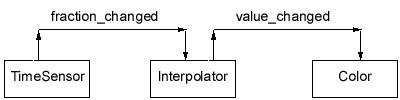
    One of the events generated by the TimeSensor node is the fraction_changed event. This event can be linked to the set_fraction event from the interpolator using a ROUTE. The interpolator will in turn generate the event value_changed. This event can then be routed to an exposed field of another node, for instance the color field of the Color node. The end result of this series of ROUTES is that the color of a given shape will change over time. The following figure shows the chaining of events between the nodes (read the figure from left to right):

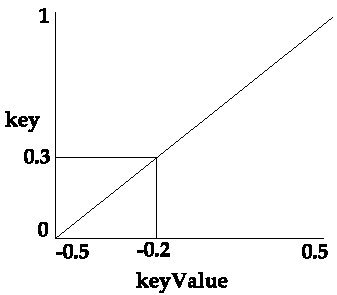
    In the remaining of this section a short disscussion of the fields present in all interpolators, key and keyValue, is presented. For instance consider that the following values for key and keyValue are given:

  • key [0 1]
  • keyValue [-0.5 0.5]
  • If the set_fraction event inputs 0 then the value_changed event outputs -0.5. Similarly when the set_fraction event inputs 1 then the value_changed event outputs 0.5.

    So what happens when the set_fraction event inputs 0.3? Well, it is time to look at the title of this section. The nodes being dealt with in here are interpolators, so when 0.3 is inputed, the output will be -0.2, i.e. the value which would correspond to the key 0.3 if all possible pairs ( key, keyValue) were specified and assuming that the pairs mentioned correspond to a straight line. The following figure shows how the keyValue for key 0.3 was computed.

    The above example is a very simple one, you just specify two values for the key and the interpolator node does the rest.

    This is OK if you want to specify a linear relation between key and keyValue. However there are situations when the desired relation is not linear.

    You can specify as many elements as desired in the key and keyValue lists, note however that the lists must have the same length.

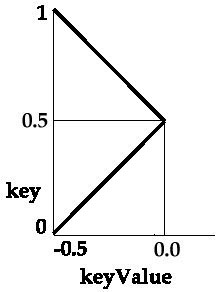
    For instance consider that the following values for key and keyValue are given:

  • key [0 0.5 1]
  • keyValue [-0.5 0.0 -0.5]
  • The above figure represents the line segments which define the interpolator. In this example, a key of 0.3 and a key of 0.7 correspond to the same keyValue.

    By using a larger number of points you can approximate a curve.